
Why Texting Fails for Jobsite Communication

Texting is not going away on construction projects.
It is fast, familiar, and useful when someone needs an immediate answer. A superintendent can send a photo, ask a question, and receive a response within minutes.
The problem begins when text messages become the primary system for managing jobsite communication.
A text message may solve the immediate conversation, but it rarely creates a complete project record. Photos, questions, decisions, assignments, and updates become scattered across personal phones and separate group conversations.
Weeks later, the team may remember that something was discussed but struggle to find what was decided.
The Conversation Belongs to a Phone, Not the Project

Traditional text messages are organized around people. Construction work is organized around projects, locations, milestones, and issues.
A project manager may have separate conversations with:
- The superintendent
- The electrician
- The plumber
- The owner
- The architect
- The supplier
- Office staff
- Individual trade contractors
Information about one condition can be divided among several of these conversations. No single thread provides the full story.
When communication is stored inside a project, the team does not need to remember who sent the message. They can open the project, location, photo, or issue and see the related conversation.
Texted Photos Often Lack Context
Consider a common jobsite text:
“What do you want us to do about this?”
A photo is attached, but the message does not identify:
- The project
- The building
- The floor
- The room
- The wall
- The construction stage
- The drawing or detail involved
- Whether the condition was corrected
The sender and recipient may understand the photograph at that moment. Three months later, the image may be difficult to identify.
A useful construction photo needs context. It should be connected to a project, location, date, milestone, and reason it was taken.
Without that information, the photo may show the condition without creating a usable record of it.
Group Texts Create Multiple Versions of the Conversation
Jobsite group texts change constantly.
Someone is added after the conversation begins. Another person receives a screenshot. A subcontractor starts a separate thread. The project manager forwards an image to the owner without the earlier messages.
Before long, several versions of the same conversation exist.
This can create uncertainty about:
- Who received the information
- Which response was final
- Whether the right person approved the work
- Who was expected to act
- Whether the problem was resolved
Adding more people to a group text does not necessarily create better communication. It often creates more places where important information can become fragmented.
A Message Is Not the Same as an Assigned Issue

Sending someone a message does not create clear accountability.
A text might say:
“Can you take care of this?”
That leaves several unanswered questions:
- Who owns the correction?
- How urgent is it?
- When is it due?
- Is the work in progress?
- Has it been completed?
- Who verified the correction?
A proper jobsite issue should have an assigned person, status, priority, due date, location, supporting photographs, and completion record.
Texting communicates the request. Issue tracking manages what happens next.
Field Updates Become Buried

A superintendent may send an excellent end-of-day update through text:
“Framing crew finished the second floor. Electricians started rough-in. Waiting on revised window details. Rain delayed exterior work.”
The update is useful, but tomorrow it will be surrounded by new messages, photos, questions, and unrelated conversations.
Over several months, important field information becomes buried inside hundreds of texts.
Structured field updates create a running project history. Team members can review what happened on a particular day without scrolling through personal conversations or asking the superintendent to explain it again.
A good construction progress documentation process connects updates with project milestones, photographs, issues, and locations.
Screenshots and Markups Get Separated From the Original
Jobsite questions often require someone to circle an area, draw an arrow, or add a note to a photograph.
When this happens through texting, the process may look like this:
- A field employee sends a photograph.
- The project manager saves it.
- The project manager marks it up.
- The edited copy is sent back.
- Someone forwards it to a trade contractor.
- A new photograph is sent after the correction.
The original photo, annotation, instructions, and completion photo now exist as separate images across multiple phones.
In-app annotations keep the explanation connected to the original photograph. An arrow, circle, shape, or note can identify the exact condition being discussed without creating another disconnected copy.
Important Information Leaves With Team Members
Construction teams change.
Employees move to another project. Subcontractors finish their work. Phones are replaced or damaged without backups. Group conversations become inactive. A project manager or superintendent may leave the company.
When project communication exists primarily on personal devices, the company may lose access to valuable information when a person leaves.
Project records should belong to the company and project, not remain dependent on one person’s phone.
Centralized communication helps preserve the history for warranty questions, owner handoff, future repairs, closeout, and team turnover.
Text Messages Are Difficult to Turn Into Reports
Texting may document that a conversation occurred, but it does not organize the information for reporting.
A builder cannot easily generate a report showing:
- All open project issues
- Outstanding critical items
- Corrections completed this week
- Field updates from a particular milestone
- Conversations connected to a room
- Photos documenting a specific trade
- Work awaiting verification
Someone must manually find, interpret, and reorganize the messages.
When communication is structured from the beginning, project reports can be created from information the team is already collecting.
A Better Way to Manage Jobsite Communication
ACTABUILD organizes communication around the construction project instead of the phone number.
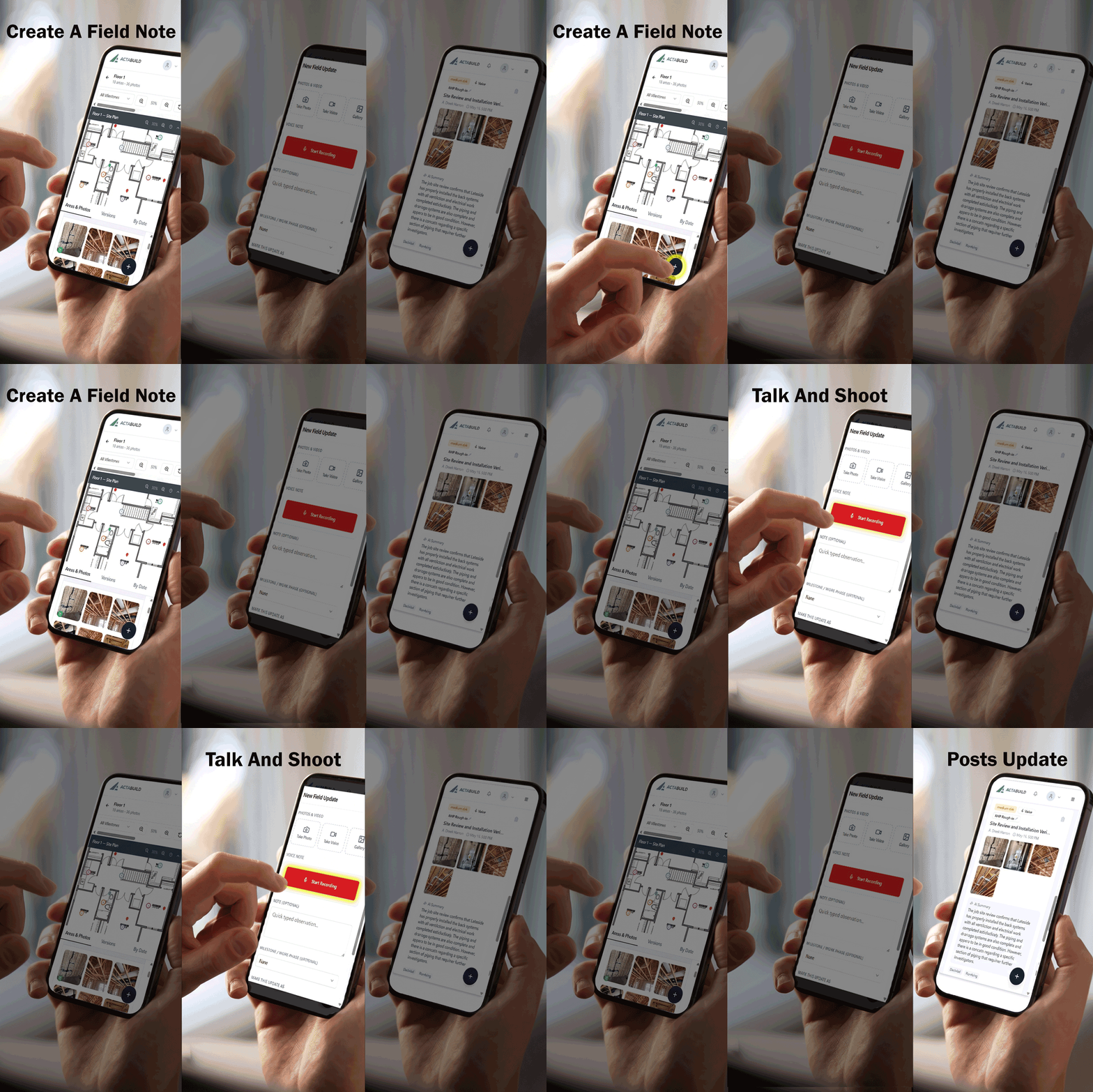
Field Updates
Field teams can record what happened, what changed, what is coming next, and what needs attention. Updates create a chronological project record that can be reviewed later.
In-App Chats
Project conversations remain available to authorized team members inside the app. The communication stays with the project rather than becoming buried in personal text threads.
Photo Annotations
Your content goes here. Edit or remove this text inline or in the module Content settings. You can also style every aspect of this content in the module Design settings and even apply custom CSS to this text in the module Advanced settings.
Issue Tracking
A condition can be turned into an issue with a status, priority, assignee, due date, comments, location, and supporting photographs. The team can follow the issue from discovery through resolution.
Together, these tools connect the conversation with the work it describes.
Texting Can Still Have a Role
Texting is useful for short and immediate communication:
- “I am at the gate.”
- “Please call me.”
- “The delivery is here.”
- “There is an urgent issue in the app.”
- “Can you review the field update?”
The goal is not to eliminate texting. The goal is to stop treating it as the permanent project record.
A simple communication standard can help:
Use text messages for alerts. Use the project platform for documentation, decisions, updates, and assigned work.
If a conversation affects cost, schedule, quality, responsibility, concealed work, or project completion, it should be recorded with the project.
Keep Jobsite Conversations Connected to the Work
Jobsite communication becomes more valuable when the conversation, photograph, location, decision, and resulting action remain connected.
Instead of searching personal phones for an old message, the team should be able to open the project and see:
- What happened
- Where it happened
- Who discussed it
- What was decided
- Who was assigned
- Whether it was resolved
ACTABUILD brings jobsite chats, field updates, photo annotations, issues, and visual documentation into one organized project record.
Learn more about the ACTABUILD construction documentation platform.